Relationships
Datasets can store relationships to other entities, either other datasets in the same SciCat catalog or entities outside of it, e.g. a SciLog logbook entry, a journal article (via DOI) or an arXiv preprint. Previously, relationships could only point to other SciCat datasets; the schema was generalized to support external entities too, see backend PR.
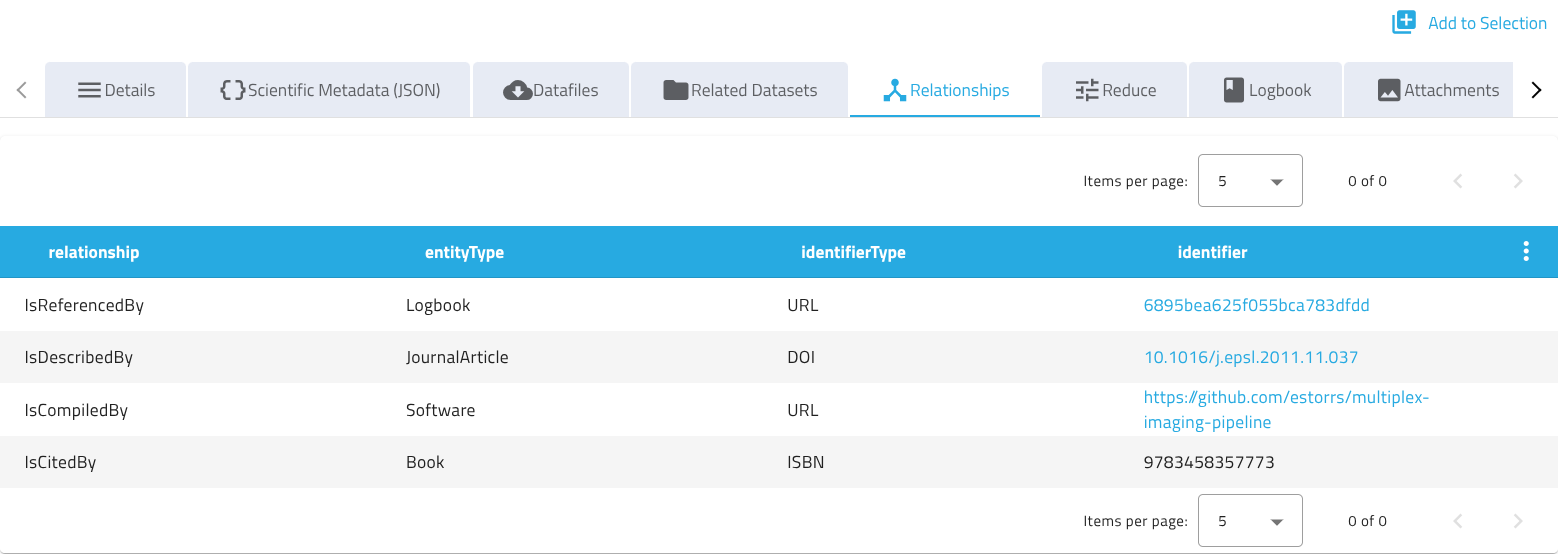
Relationships are displayed on the dataset detail page in a dedicated Relationships tab, see frontend PR.
The schema is inspired by DataCite's relatedIdentifier property, where identifierType roughly corresponds to DataCite's relatedIdentifierType, relationship to relationType, and entityType to resourceTypeGeneral.
Relationship fields
Each entry in a dataset's relationships array describes a link to one related entity:
| Field | Required | Default | Description |
|---|---|---|---|
identifier |
yes | - | Identifier of the related entity, e.g. https://example.org/datasets/123, 10.1016/j.epsl.2011.11.037, arXiv:0706.0001. |
identifierType |
no | Other |
Type of the identifier, e.g. URL, DOI, arXiv. Local may be used for SciCat-internal identifiers. |
relationship |
no | IsReferencedBy |
Nature of the relationship between this dataset and the related entity, e.g. IsReferencedBy, IsSupplementTo, IsCitedBy. |
entityType |
no | Other |
Type of the related entity, e.g. Dataset, Logbook. |
externalId |
no | - | Identifier of the related entity within its own external system. Not used for SciCat-internal relationships. |
If identifierType is set to URL, the identifier must be a valid URL, otherwise the request is rejected.
Local is currently just a naming convention, reserved for possible future support for linking SciCat-internal entities through relationships; it has no special handling today. Existing SciCat-internal links, e.g. to instruments or samples, are handled through the dataset's own instrumentIds and sampleIds fields, not through relationships.
Viewing relationships in the UI
If enabled, the dataset detail page shows a Relationships tab listing all relationships of the dataset in a table, with client-side pagination and sorting. Identifiers of type URL or DOI are rendered as clickable links, other identifier types are shown as plain text.
Enabling in the frontend
The tab's visibility is controlled by the datasetRelationshipsEnabled frontend config key, see the frontend configuration guide.
Example usage
Relationships can be added or updated via PATCH /api/v4/datasets/:pid, for example to link a dataset to a SciLog logbook and a journal article:
{
  "relationships": [
    {
      "identifier": "https://scilog.example.ch/logbooks/6895bea625f055bca783dfdd",
      "identifierType": "URL",
      "entityType": "Logbook",
      "externalId": "6895bea625f055bca783dfdd"
    },
    {
      "identifier": "10.1016/j.epsl.2011.11.037",
      "identifierType": "DOI",
      "entityType": "JournalArticle"
    }
  ]
}
Since relationships is an array, a PATCH request replaces the whole array rather than merging individual entries. If two clients patch it concurrently without coordination, one update can silently overwrite the other. To avoid this, send the If-Unmodified-Since header with the dataset's last known updatedAt timestamp: the backend enforces this precondition atomically and responds with 412 Precondition Failed if the dataset was modified in the meantime, see PR.